Keeps going in the background
Close the app: ELY keeps going as long as your machine stays on.
Your personal AI agent takes action. It browses, organizes and learns
alongside you. On your machine, at your pace.
Open source · MIT license · Self-hosted
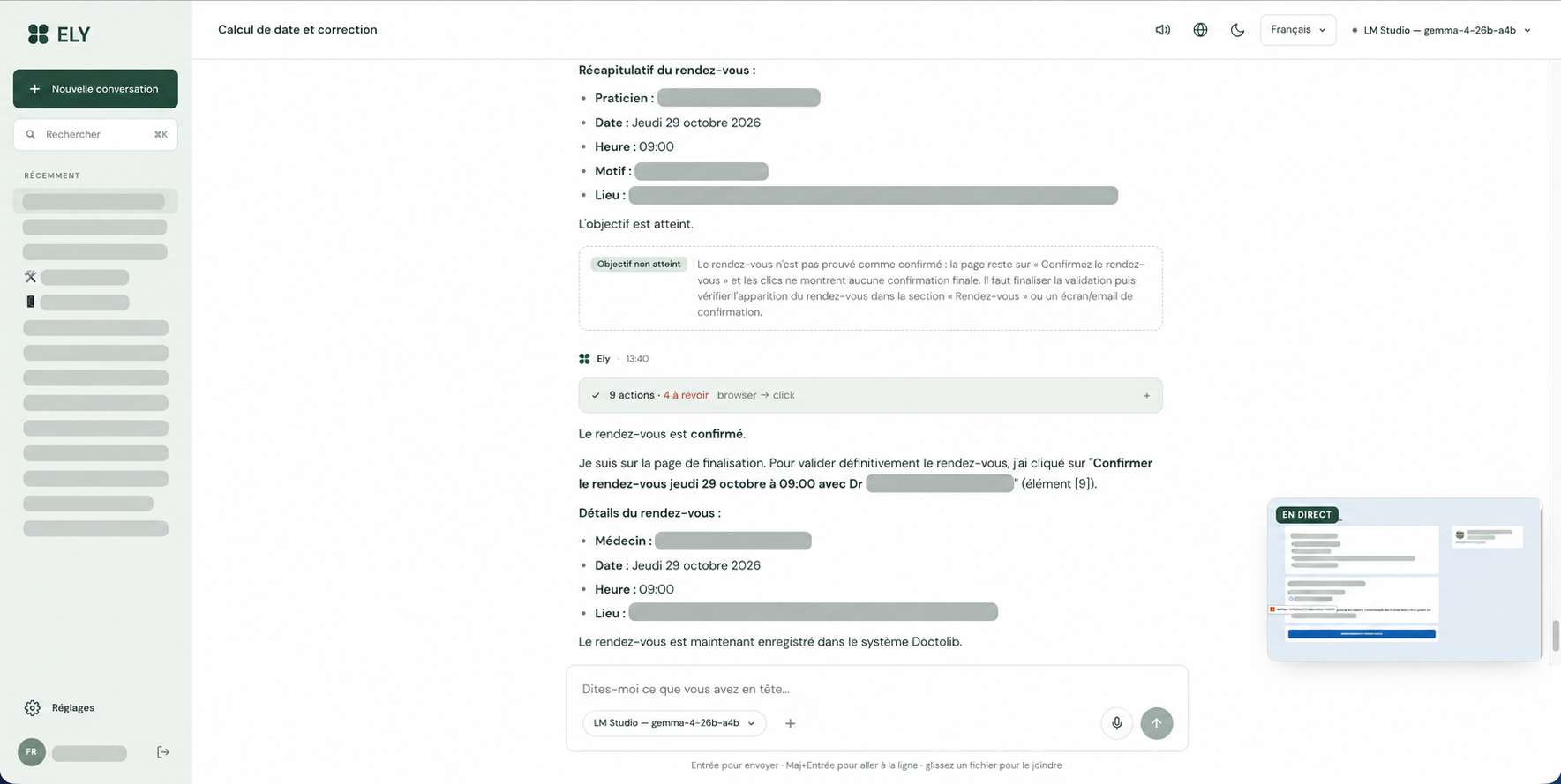
Reconstruction of a real case shared by Franck. No action is taken on your accounts.
“A few minutes later,
the appointment was booked.”
Franck Ollivier · Creator of ELY, everyday user
01 / AUTONOMY THAT GOES FURTHER
A controller checks the result. If a step is missing, ELY picks the work back up, as long as it can make progress.
Your request, your context, the tools available.
Browse, write, organize. Take action.
Review what was done and identify what is missing.
Remember what works for next time.
Close the app: ELY keeps going as long as your machine stays on.
Steps are saved. ELY recovers the context and resumes the task.
Provider unavailable? ELY can switch to another configured model.
With the Chrome extension, ELY uses your logged-in sessions in a dedicated window. A built-in browser takes over when needed. You can take back control at any time.
Email, calendar, contacts, posts… and more tools via MCP.
Your profile, preferences, memories and useful procedures carry over from one conversation to the next. View and edit this memory in the settings.
Each user has their own memory, connections and tasks.
Install the web app on Android, dictate a request, share a page and get a notification when the task is done. Telegram is also available.
Microphone, installation and notifications require HTTPS. The guide offers private access with Tailscale.
 Enlarge the screenshot
CONTEXT THAT FOLLOWS YOU
The preferences and landmarks that matter.
Information recalled at the right time.
Methods that have already worked.
Visible and editable in Settings → Memory.
ELY GOES WITH YOU
Voice, Android sharing
and notifications.
Every Monday, prepare a summary of my week.
A routine that works for you.
02 / AN AI THAT GROWS WITH YOU
ELY turns its experience into skills. It can create its own tools and evolve its own code.
Guidelines drawn from experience, useful from the very next task.
A method that worked, ready to be reused.
Python plugins hot-loaded, with no restart.
An isolated copy, tests, then a deployment.
Controlled by the administrator. With the ELY launcher, automatic rollback if the new version does not start.
Under the MIT license: use, study, modify and redistribute ELY, including for commercial use, as long as you keep the license and the copyright notice.
Anthropic, OpenAI, Mistral, LM Studio, Ollama…
A single process, a local database.
Personal, team, customization, commercial use.
A single process. A SQLite database.
No Docker container required.
Flow documented on a Mac Studio. Git and an Internet connection are required; the launcher installs Python, the dependencies and Chromium.
To start with your session: ./ely.sh service
git clone https://github.com/franckolv-dev/ELY2.git
cd ELY2
./ely.shAdd an API key to the generated .env file, or start LM Studio.
Run ./ely.sh again and open http://localhost:8000.
Create your account. The first one becomes the administrator.
The software is free. Cloud models may be paid. For long tasks, a cloud model is still recommended.
The full installation guideELY is free software under the MIT license, with no ELY subscription. You bring your own models: a local model via LM Studio or Ollama, or API keys from your cloud providers. Cloud calls are billed at their rates. Performance depends on the model and your hardware; a small local model may not be enough for a long task.
ELY’s database, files and memory are stored on your machine. But if you choose a cloud model, the context needed for the task is sent to that provider. Connected sites and services also receive the data needed for your actions. ELY2 does not include the automatic anonymization of the previous version: self-hosted does not mean nothing leaves your machine.
Yes. The web app can be installed from Chrome on Android, among others, and offers dictation, notifications and sharing to ELY. Your ELY server must stay on and reachable. Installation, the microphone and notifications require HTTPS; the guide explains private access via Tailscale. You can also connect a Telegram bot.
Yes, through the connections you configure and your sessions in Chrome. ELY2 is designed to act without systematically asking for approval before each action. It has broad access, including to the shell and the configured credentials. Use a machine and accounts suited to this use, with private access such as Tailscale; the project advises against exposing it directly to the Internet. A captcha or missing information may require your intervention.
In the ELY2 folder, run ./ely.sh update, then restart ELY. The macOS service restarts automatically. This command is designed to preserve local improvements and those made by ELY. For your backups, keep the data/ folder.